Optimizing your LinkedIn presence in B2B

LinkedIn B2B is now an essential lever for SMEs, consultants, and marketing leaders seeking to increase visibility and generate qualified leads. Yet, many businesses underutilize its potential.

In this article, we will explain how to structure an effective presence on LinkedIn B2B, from profile optimization to creating engaging content. By the end, you’ll know exactly how to leverage LinkedIn B2B to boost your strategy.

Why LinkedIn is essential in B2B

LinkedIn is the world’s largest professional network with over 950 million users. Beyond numbers, LinkedIn uniquely allows you to:

  • Build credibility with a professional profile.
  • Share content that attracts the right audience.
  • Engage directly with decision-makers.
  • Support prospecting and social selling

👉 To align LinkedIn with a broader digital strategy, see our guide : digital transformation for SMEs.

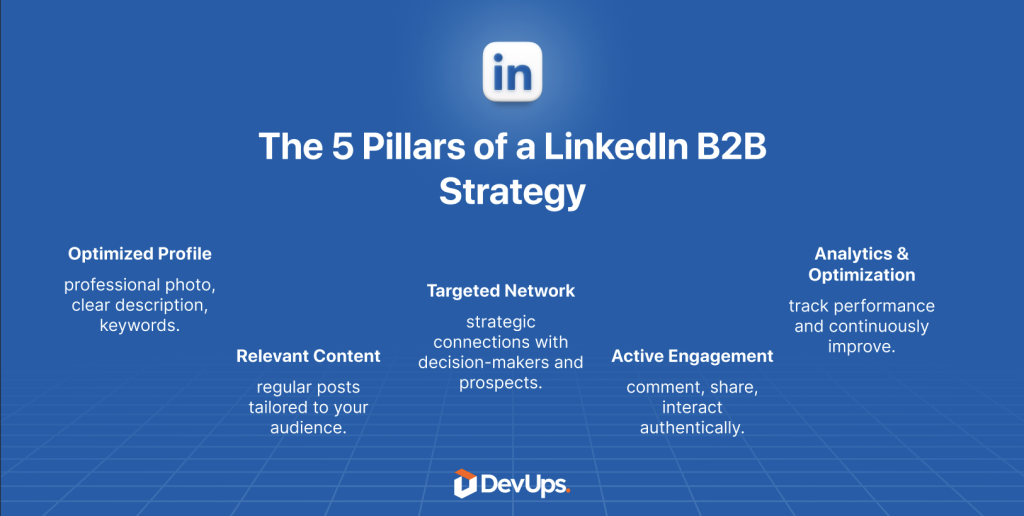
Optimize your profile for LinkedIn

A profile is your digital business card. On LinkedIn , it should function like a landing page: every element counts.

Key elements of an effective profile

  • Professional photo and customized banner reflecting your brand.
  • Impactful headline: e.g., “Helping SMEs achieve X” rather than just “Director.”
  • Client-focused summary: highlight problems you solve.
  • Detailed experience with measurable results.
  • Recommendations to strengthen social proof.

👉 Need a framework before you start? Check our guide create a specification document
Produce impactful content on LinkedIn B2B

Visibility comes from regular publishing but not all content is equal.

Top performing formats

  • Short posts (200–300 words) with visuals.
  • Carousel PDFs to explain processes.
  • Short videos (30–90 sec) with subtitles.
  • Case studies demonstrating results and client stories.

Checklist for LinkedIn B2B content:

  • Post at least twice a week
  • Mix formats (text, video, carousel)
  • Include subtle call-to-action
  • Use 3–5 relevant hashtags
  • Respond to comments within 24 hours

👉 To see how automation can simplify content distribution, read: marketing automation , how to start
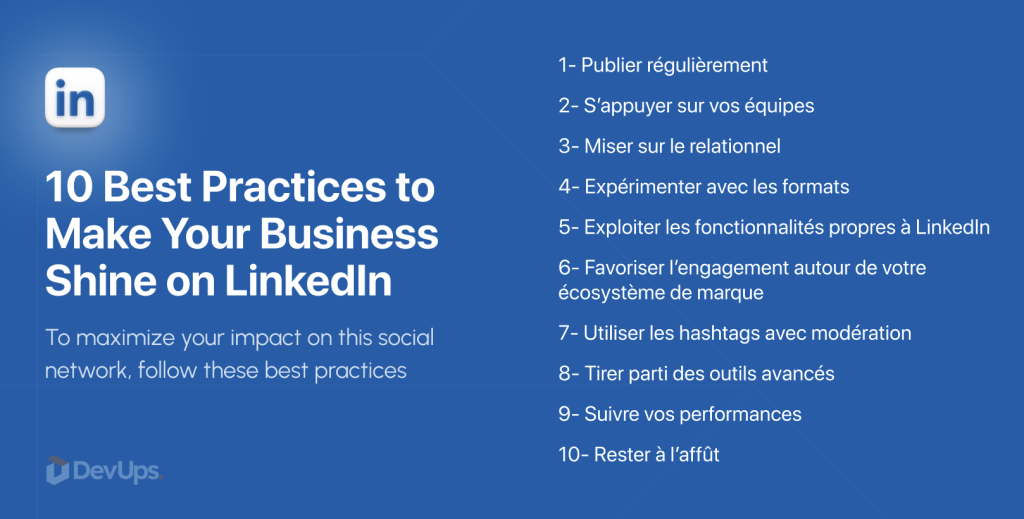
10 Best Practices to Make Your Business Shine on LinkedIn

Build a strategic network

A large network alone is not enough. Quality of connections matters most on LinkedIn.

Best practices

  • Target decision-makers (CEO, COO, marketing directors).
  • Personalize every connection request.
  • Engage with prospects’ posts.
  • Join relevant LinkedIn groups.

👉 To structure processes more effectively, explore our services.

DevUps approach to LinkedIn B2B

At DevUps, we help SMEs and consultants professionalize their LinkedIn presence through:

  • Profile and company page audit
  • Tailored editorial line
  • Prospecting routines setup
  • KPI tracking and adjustments

👉 Learn more about our approach and offerings on our services.

Conclusion

LinkedIn B2B is more than a social network—it’s a strategic growth lever. By optimizing your profile, posting regularly, and engaging your network, LinkedIn B2B can become a powerful lead-generation engine.

📩 Ready to evaluate how the Infomaniak ecosystem could fit your organisation?
👉 Contact us to start the conversation.
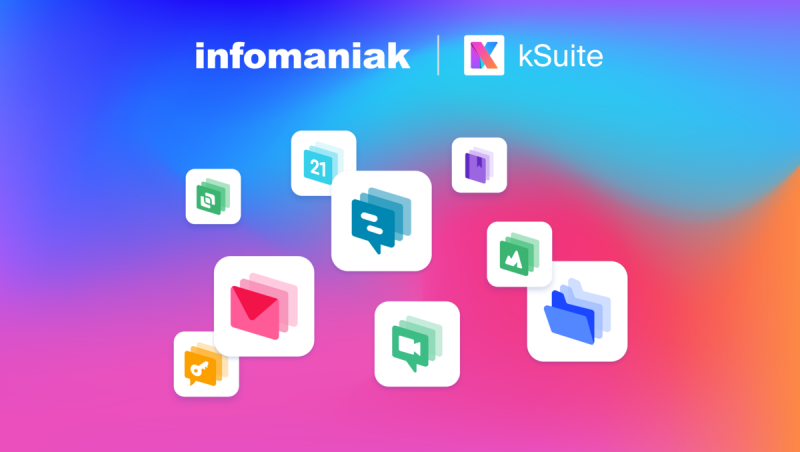
Full overview of the Infomaniak ecosystem

The Infomaniak ecosystem has become a benchmark in Europe for companies, freelancers, and organizations looking for reliable and sustainable cloud services. From web hosting to collaboration tools, Infomaniak offers a complete range of solutions designed to support productivity and digital growth.

This article explores the Infomaniak ecosystem in depth, explains its main products, and highlights why SMEs and startups choose this Swiss alternative to big tech giants. At the end of this journey, you will clearly see the value of the Infomaniak ecosystem.

What is the Infomaniak ecosystem?

Infomaniak is a Swiss provider founded in Geneva that offers a tightly integrated set of digital services. The Infomaniak ecosystem is designed so products work together with minimal friction, which reduces overhead and improves security and user experience.

Key elements of the Infomaniak ecosystem include:

  • Web hosting & cloud servers — managed hosting, virtual servers and scalable cloud platforms.
  • kSuite — professional email, calendar, video conferencing and collaboration tools.
  • kDrive — secure file storage and sharing with multi-device sync.
  • Streaming & VOD — live streaming and video-on-demand solutions.
  • Emailing & marketing tools — GDPR-friendly campaign and transactional email services.

👉 To frame how these tools fit into a broader digital strategy, see our guide on digital transformation for SMEs.

écosystème Infomaniak-DevUps

Why choose the Infomaniak ecosystem?

The Infomaniak ecosystem stands out on several critical dimensions for SMEs: sovereignty, sustainability, integration and cost-effectiveness.

  1. Data sovereignty — all data stored in Switzerland under strict privacy rules.
  2. Green operations — data centers powered by renewable energy.
  3. Seamless integration — services designed to interoperate, reducing integration overhead.
  4. Competitive pricing — an affordable alternative to Google Workspace or Microsoft 365 for many SMEs.
CriterionInfomaniakGoogle WorkspaceMicrosoft 365
Data locationSwitzerlandUSAUSA
GDPR complianceStrongVariesVaries
Green ITYesLimitedLimited
SME pricing (est.)CompetitiveHigherHigher

👉 The integration gains are similar in spirit to what you can achieve with automation tools — for instance read our piece on automating with Zapier..

Focus product: kSuite and kDrive

kSuite forms the collaboration backbone of the Infomaniak ecosystem. It bundles:

  • Professional email and domain hosting.
  • Shared calendar and contacts.
  • Video conferencing (Meet).
  • Basic collaborative document features.

kDrive, provides secure cloud storage that can replace Google Drive or Dropbox where data sovereignty and control matter. Notable features:

  • File sync across devices.
  • Granular sharing permissions.
  • Real-time collaboration where applicable.

👉 If you need a structured launch plan, our guide on creating a specification document , helps define scope and milestones.

How to integrate the Infomaniak ecosystem in an SME

Migration should be pragmatic and phased. A sensible rollout looks like this:

  1. Assess needs — map communications, storage and web requirements.
  2. Start with the essentials — migrate email and kDrive first for minimal disruption.
  3. Add collaboration tools — introduce kSuite Meet and shared calendars.
  4. Extend to streaming or marketing where relevant.
  5. Train teams and measure adoption.
  6. Iterate and optimise according to usage and feedback.

Checklist pratique :

  • Email accounts migrated
  • Files moved to kDrive
  • Shared calendars activated
  • Video conferencing adopted
  • Team training scheduled

👉 For automation patterns that complement Infomaniak services, see our marketing automation primer: marketing automation , how to start

Common pitfalls to avoid with Infomaniak

The Infomaniak ecosystem is powerful, but avoid these mistakes:

  • Rushing email migrations — they require careful DNS and mailbox planning.
  • Neglecting adoption — users must be onboarded and supported to change habits.
  • Under-configuring security — enforce 2FA, review sharing permissions, and audit access.

👉 Need external support to reduce migration risk? See our services.

The DevUps approach to integrating Infomaniak

At DevUps we help SMEs adopt sovereign cloud stacks like the Infomaniak ecosystem via a pragmatic, phased method:

  • Pragmatic diagnosis — identify which Infomaniak services deliver the most value fast.
  • Modular integration — implement one service at a time and validate ROI.
  • User training — reduce friction and accelerate adoption.
  • Security & compliance — ensure configurations align with GDPR and industry needs.

👉 Learn more about our approach and offerings on our services.

Conclusion

The Infomaniak ecosystem is more than a hosting provider: it’s an integrated, sovereign and eco-conscious digital platform tailored for SMEs and organisations that prioritise data control and sustainability. Choosing the Infomaniak ecosystem lets teams work securely and efficiently while aligning IT choices with corporate values.

📩 Ready to evaluate how the Infomaniak ecosystem could fit your organisation?
👉 Contact us to start the conversation.
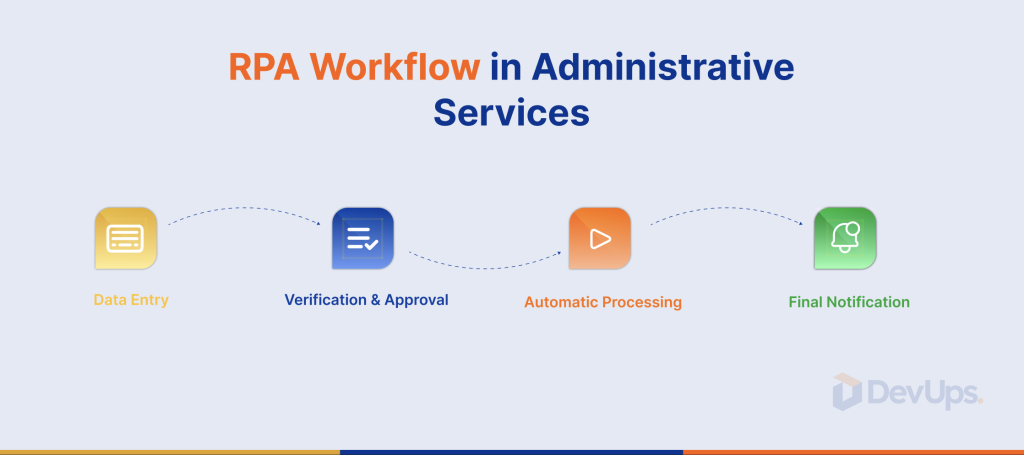
The Role of RPA in Transforming Administrative Services

Digitalization is no longer optional for SMEs—it is essential for efficiency and competitiveness. One of the most powerful levers is RPA administrative services, which automates repetitive and time-consuming tasks in administrative workflows.

In this article, we explore why RPA administrative services is revolutionizing back-office operations and how it can be integrated into a broader digital transformation strategy.

Understanding RPA and Its Connection to Administrative Services

Robotic Process Automation (RPA) uses software robots to automatically perform structured, repetitive tasks such as data entry, report generation, and invoice processing.

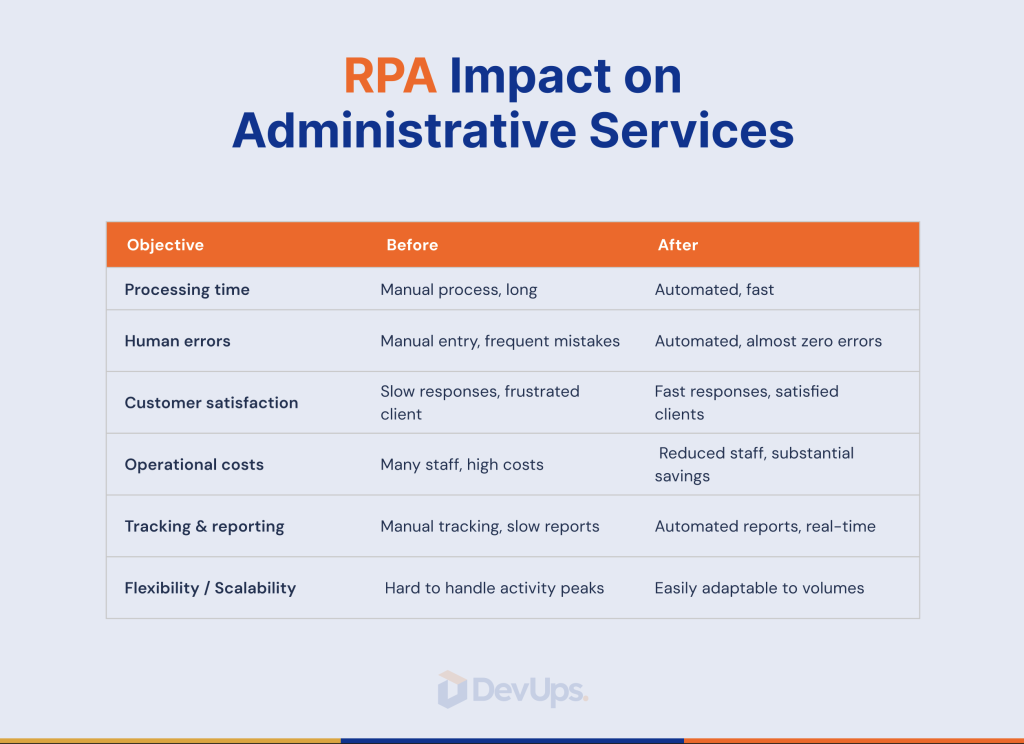
In administrative services, RPA brings three main benefits:

  1. Reduced human errors – for example, in accounting entries.
  2. Faster processing times – for invoices, HR processes, and client requests.
  3. Time savings – employees can focus on high-value activities like analysis and client relations.

👉 For a broader perspective on digital transformation, check our guide on digital transformation for SMEs.

RPA administrative services-DevUps

Why RPA is Transforming Administrative Services

Administrative operations often rely on repetitive, rule-based tasks. RPA transforms them by enabling:

  • 24/7 process continuity – robots never get tired.
  • Strict compliance with procedures – essential for audits and regulations.
  • Significant operational cost reduction.
Administrative ProcessBefore RPAWith RPA
Invoice entry4h/day20 min/day
Leave management2h/week10 min/week
Financial reporting2 days/month2h/month

👉 This aligns with the principles of automation with Zapier , a complementary tool for SMEs.

RPA Impact on Administrative Services-DevUps

Real-Life Example: Automating Invoice Management

Consider a common scenario: manual invoice processing. Without RPA, employees enter data into the ERP, manually check amounts, and archive documents.

With RPA:

  1. The robot extracts invoice data from PDF, email, or scan.
  2. It enters the data into accounting software.
  3. It validates amounts based on predefined rules.
  4. It archives the invoice.

Outcome: a task that previously took 15 minutes per invoice is reduced to less than a minute, with zero errors.

Steps to Successfully Implement RPA in Administrative Services

Implementing RPA is more than installing software. A practical roadmap includes:

  1. Map processes – identify repetitive tasks.
  2. Prioritize high-ROI processes.
  3. Draft a clear specification document.
  4. Pilot test (POC) – start with one process.
  5. Gradually scale deployment.
  6. Measure and adjust.

Practical checklist:

  • Tasks are repetitive and structured
  • Data is digital (minimal human interpretation)
  • Clear business rules exist
  • RPA tool integrates with existing software
  • Team trained to monitor and adjust robots

👉 Need guidance to start? Explore our guide on marketing automation, which complements RPA initiatives.

Common Pitfalls in RPA Adoption

While RPA is powerful, mistakes can reduce effectiveness:

  • Choosing the wrong processes – overly complex tasks may create more issues than they solve.
  • Neglecting change management – employees must understand that RPA frees time, it does not replace staff.
  • Ignoring maintenance – robots must be updated when software changes

👉 Professional guidance ensures smooth adoption. Learn more about our services.

DevUps Approach to RPA Integration for SMEs

At DevUps, we help SMEs integrate RPA into a broader digital strategy. Our methodology includes:

  • Pragmatic diagnostics – identify the most suitable processes quickly.
  • Modular ecosystem – combine RPA, Zapier, and marketing automation.
  • Agile methodology – implement in small steps, delivering fast results.
  • Secured ROI – measurable outcomes from early stages.

👉 Discover our complete offer on our services.

Conclusion

RPA administrative services is not a passing trend—it is a core enabler of digital transformation for SMEs. By freeing teams from repetitive tasks, it allows them to focus on strategic activities, client relations, and creating real value.

📩 Ready to explore RPA administrative services for your organization?
👉 Contact us today

OKRs to manage your team: method, examples, free template

OKRs to manage your team means leading by outcomes, not tasks. OKRs (Objectives & Key Results) align everyone on clear goals and measurable results, while giving teams autonomy in how they deliver. In this guide you’ll get a clear definition, a step-by-step method, real-world examples, and a free OKR template to launch this quarter—so you can adopt OKRs to manage your team with confidence.

Need a tailored setup? Talk to our experts DevUps

What are OKRs? A clear definition

OKRs are a goal-setting system used by high-performing companies to focus effort, measure impact, and drive progress.

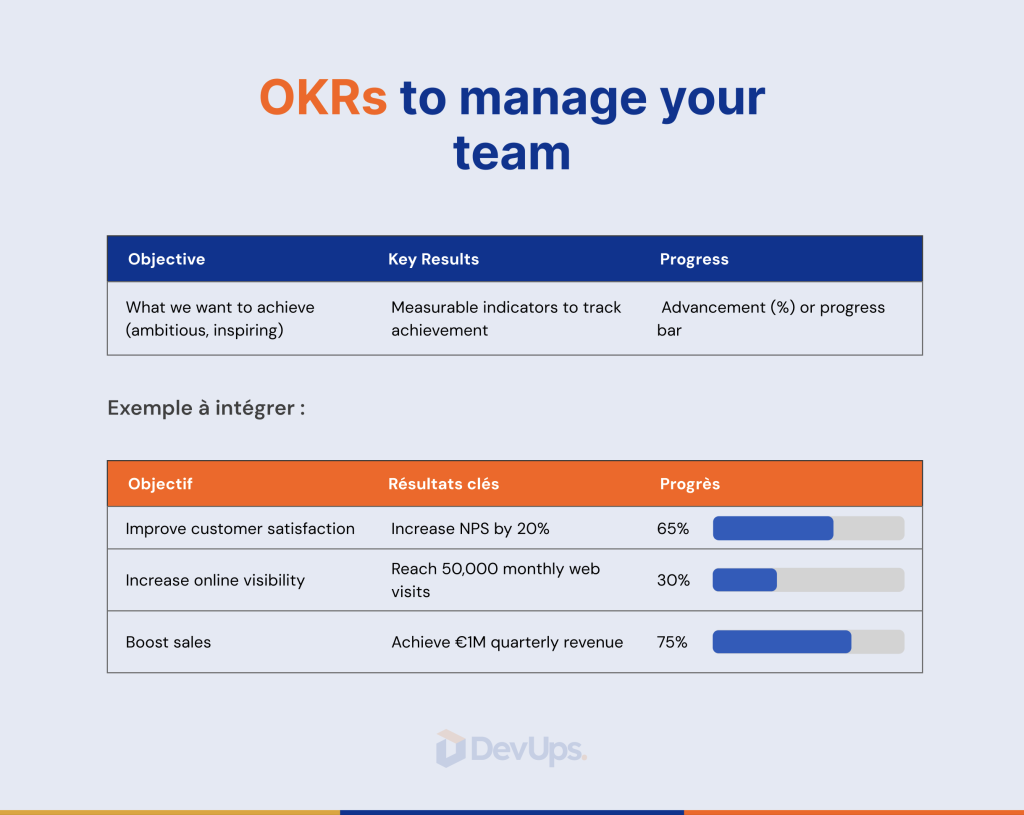
  • Objective (O): qualitative, inspiring, outcome-oriented (e.g., “Accelerate inbound acquisition”).
  • Key Results (KRs): 2–4 quantitative results that prove the Objective was achieved (e.g., “Grow from 3,500 to 10,000 monthly visitors”).

Unlike a task plan, OKRs specify what matters and how success is measured, then let teams choose the best initiatives to get there.

👉 Big-picture context for SMEs:
Why digital transformation is critical for SMEs

Why adopt OKRs to manage your team?

Adopting OKRs to manage your team helps you:

  • Align strategy with daily work (everyone knows what matters).
  • Prioritize and say no to distractions.
  • Measure progress objectively, without micro-management.
  • Empower teams through clarity and autonomy.
  • Learn fast via short cycles (monthly/quarterly).

🎯 Result: more focus, less inertia, and a culture of continuous improvement.

OKRs to manage your team vs. traditional goals

DimensionTraditional goalsOKRs
FormulationOften tasksOutcomes to achieve
MeasurementVague/subjectiveQuantified and bounded
HorizonLong and fixedShort (month/quarter)
OwnershipIndividualCollective and aligned
SteeringRetrospectiveRitualized weekly reviews

💡 OKRs don’t replace KPI. KPI describe the state; OKRs drive the change.

How to structure effective OKRs to manage your team

A solid OKR has three parts: clear Objective, measurable KRs, and reliable metrics. Use these real-world examples out of the box.

Example 1 — Marketing (SMB B2B)

Objective: Increase qualified organic visibility.
Key Results:

  1. Grow from 3,500 to 10,000 monthly unique visitors (GA4).
  2. Earn 3 high-authority backlinks (DR ≥ 60).
  3. Reach 2,000 qualified LinkedIn followers (≥2.5% engagement).

Example 2 — Sales (inbound)

Objective: Improve conversion on inbound leads.
Key Results:

  1. Raise close rate from 12% to 20%.
  2. Cut average sales cycle from 21 to 14 days.
  3. Publish 8 customer testimonials (site/LinkedIn).

Example 3 — Product (SaaS / customer portal)

Objective: Accelerate adoption of portal v2.
Key Results:

  1. Lift MAU from 15% to 40%.
  2. Achieve NPS ≥ 35 on v2.
  3. Reduce onboarding-related churn from 20% to 10%.
📥 Download the OKR template (Excel): Download

Use the Team_OKRs sheet to duplicate these examples and launch your quarter.

OKRs to manage your team with objectives and key results

Implement OKRs in 5 steps to manage your team

  1. Educate: explain “outcomes, not tasks,” share 1–2 internal examples.
  2. Choose cadence: quarterly for strategy, weekly for reviews.
  3. Co-write: 1–3 Objectives per team, 2–4 KRs per Objective, clear metrics.
  4. Review without micro-managing: weekly check-ins (progress %, confidence, status).
  5. Learn and iterate: end-of-cycle retro, keep what works, adjust the rest.

👉 Automate reminders and updates (Slack/Email/Notion): Automate tasks without code using Zapier

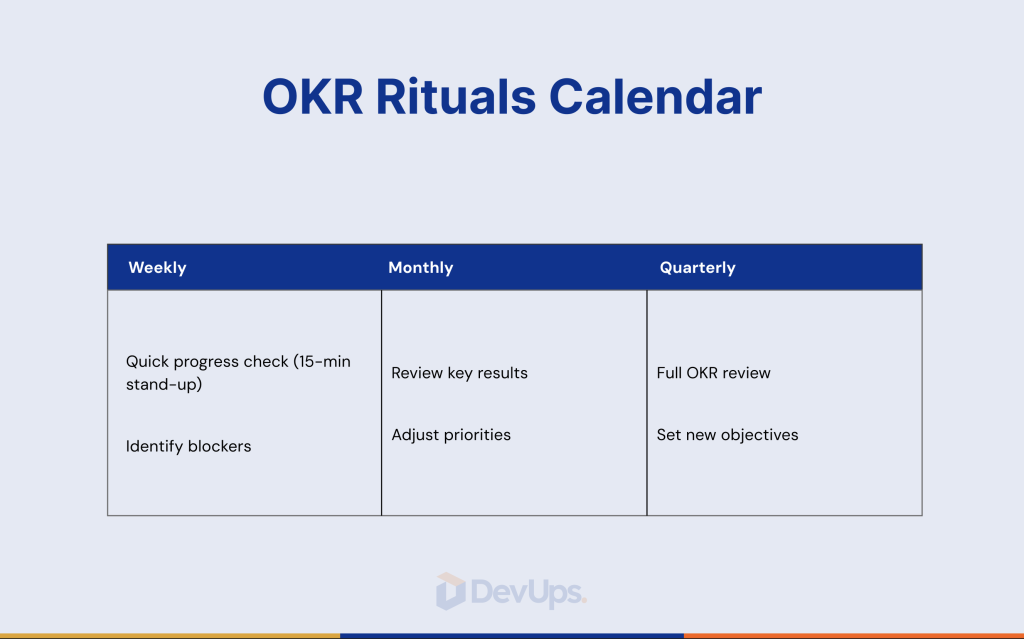
Review rituals: weekly, monthly, quarterly

  • Weekly (30 min): update KRs (progress %, confidence 0–10, RAG status), unblock decisions.
  • Monthly (60 min): alignment review, reprioritize initiatives.
  • Quarterly (2 h): retrospective, insights, new OKRs.

Pro tip: distinguish results (KRs) from initiatives (projects). You adapt the initiatives—not the ambition of the KRs at the first obstacle.

OKRs to manage your team with weekly and monthly rituals-DevUps

Tools to anchor OKRs in daily work to manage your team

  • Notion / ClickUp: OKR pages by team + embedded check-ins.
  • Google Sheets + GA4: single sources of truth for metrics.
  • Zapier: auto-reminders, CRM/Slack sync, field updates.

👉Useful no-code flow: Automate tasks without code using Zapier

Common mistakes to avoid

  • Too many Objectives: stick to 1–3 per team.
  • Output KRs instead of outcome KRs: “publish 12 posts” ≠ “+2.5% engagement.”
  • Unreliable metrics: define sources and formats.
  • No rituals: without reviews, OKRs stay theoretical.
  • Changing KRs mid-cycle: adjust initiatives, not the target.

📘 Read next: Marketing automation: why and how to get started

Our OKR method at DevUps

We deploy OKRs to manage your team with a modular approach:

  • Strategic framing + co-writing workshop.
  • OKR template setup (Notion/ClickUp/Excel) connected to your data.
  • Automated rituals (Slack/Email) and dashboards.
  • 4–12 weeks of coaching to embed routines.

👉 Explore strategy & operations support: DevUps services

Conclusion

Choosing OKRs to manage your team means choosing clarity, accountability, and steady progress. Start with one Objective per team, measurable KRs, and regular reviews. The rest—discipline, alignment, results—follows naturally.

📥 Download the DevUps OKR template and start your first cycle: Download

📩 Want a coach to deploy the method and keep it running?
👉 Contact DevUps—we’ll set up the system so you can focus on outcomes.

Storytelling and branding for SMEs: build a brand that resonates

Storytelling and branding for SMEs are not just for luxury brands or global corporations. In fact, for small and medium-sized businesses, they’re among the most powerful levers to build trust, create emotional connection, and differentiate — without massive budgets.

Consumers today don’t just buy products.
They buy into stories, values, and identity.

In this guide, we’ll explore how to build a strong brand using authentic storytelling — even if you’re a small team with limited time.

Want to understand how this fits into a broader transformation? : Why digital transformation is a vital shift for SMES

Why storytelling and branding for SMEs is a powerful weapon

Storytelling gives your brand emotional depth. Branding gives it clarity and consistency. Together, they allow you to:

  • Create meaningful connections with customers
  • Stand out in competitive or saturated markets
  • Position your offer in a way that feels real and memorable
  • Attract talent, loyalty, and community — not just sales

Creating emotion in a crowded world

People are overwhelmed with marketing messages.
They don’t remember product features. They remember how you made them feel.

That’s where storytelling changes everything.
Where did your company come from? Who are you trying to help? What’s the bigger mission?

Differentiating without big budgets

You don’t need a Super Bowl ad.
A clear message, a cohesive tone, and the right narrative — across all touchpoints — is often more powerful.

📘 Bonus read : Inspiring storytelling examples for SMEs (and why they work)

The pillars of strong branding for SMEs

Branding is not just a logo — it’s how your company is recognized, remembered, and trusted.

Visual consistency and voice tone

  • Your logo, colors, and fonts
  • Your tone on social media, website, and emails
  • Your image style and content rhythm

A strong brand should be recognizable even without a logo.

Values, mission, and vision: more than a page on your website

What do you stand for? What are you against?
If you say you care about transparency — how does that show up in your pricing? In your customer support?

Creating an authentic brand narrative

Your story should include:

  • A clear “why” behind your business
  • A unique promise to your audience
  • Proof through real stories, clients, and transformation

How to structure your storytelling and branding in 2025

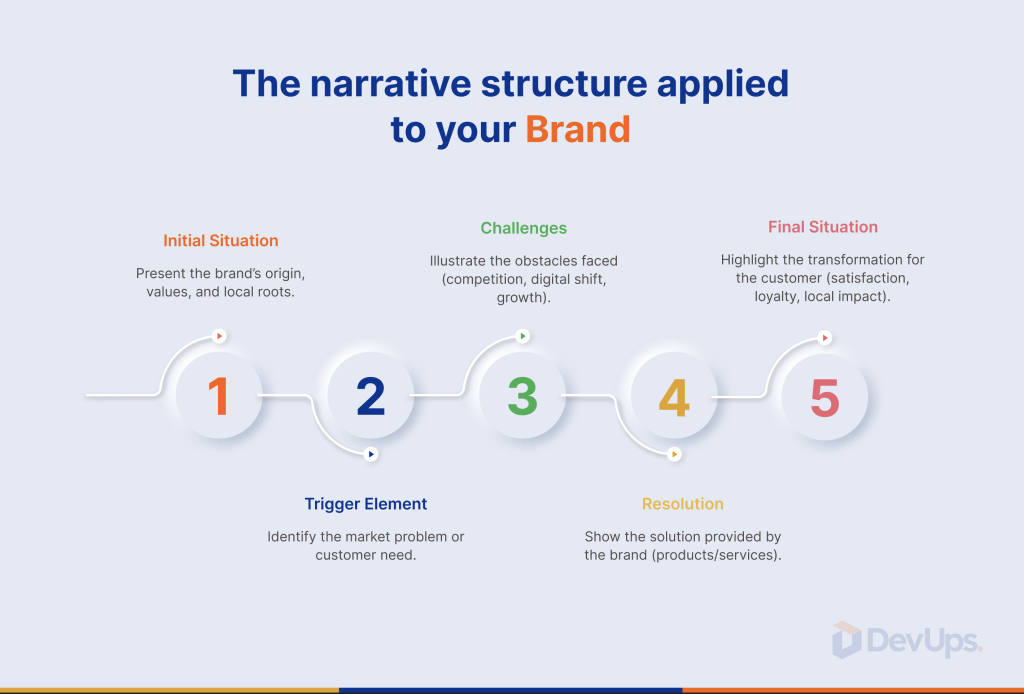
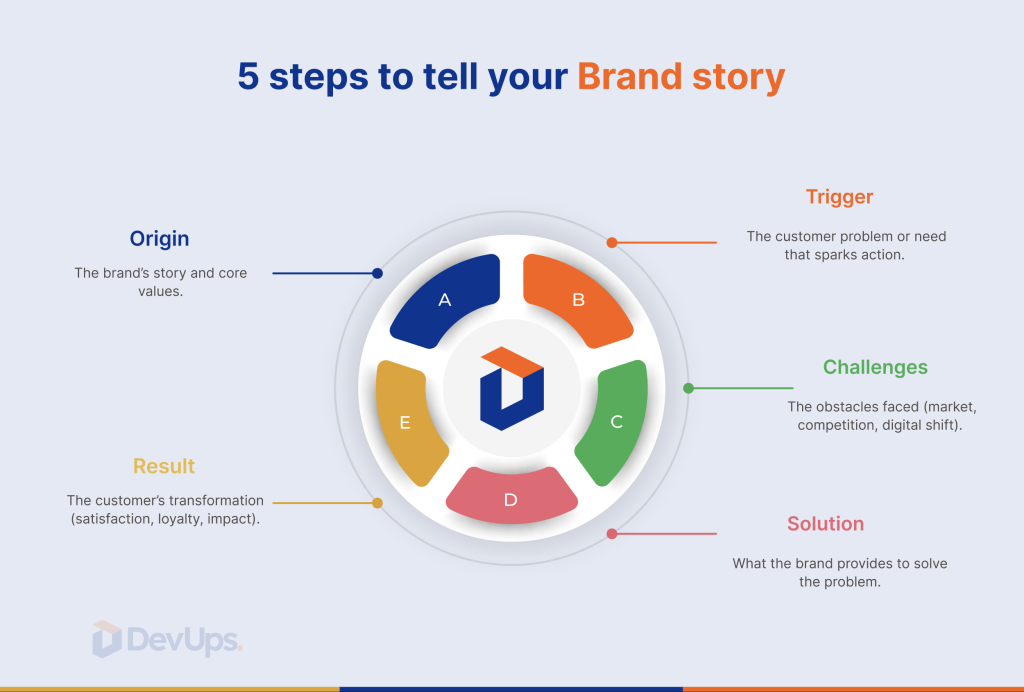
Storytelling today isn’t guesswork — it follows timeless structures.

the narrative framework for small businesses

  1. The context – Who are you and what’s your market?
  2. The challenge – What pain or “villain” are your customers facing?
  3. The solution – What makes you different?
  4. The transformation – What results can clients expect?
  5. The future – Where are you going together?

The importance of channels in storytelling and branding

Your story shouldn’t live in a PDF or slide deck.
It must show up in:

  • Your website (About page, sales pages, blog)
  • Your social content
  • Your newsletters and email sequences
  • Your onboarding, CRM, and automation journeys

Branding and automation: a powerful duo

Once your branding and storytelling are clear, they become the foundation for smart automation.

You can:

  • Personalize your content at scale
  • Build storytelling-based nurture sequences
  • Align tone and message across all automated touchpoints

📘 Related article : Marketing automation: what it is and how to get started

Our branding approach at DevUps

At DevUps, we help companies build modular, narrative-first brands — not just visuals.

Our method includes:

  • A full brand platform: positioning, values, tone, visual identity
  • Story-driven messaging tailored to your ideal customer
  • Multi-channel activation: website, social, email, automation
  • Design systems and content templates your team can use daily

👉 Discover our approach

Conclusion

Storytelling and branding for SMEs isn’t about looking big. It’s about being clear, relatable, and intentional.

In competitive markets, your story is your edge. And your brand is your promise delivered with consistency.

📩 Ready to shape your brand narrative with clarity and impact?Contact our experts

Swiss hosting: protect your data and build digital trust

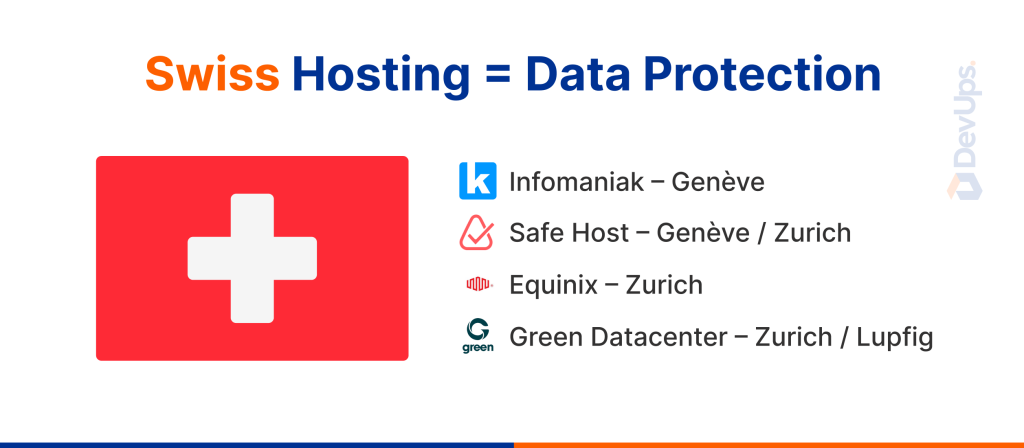
Choosing Swiss hosting is not just about where your server is — it’s a strategic move to protect your data, ensure compliance, and earn user trust.

In a world of growing cybersecurity threats and strict privacy regulations, hosting your website or digital infrastructure in Switzerland sends a strong message: you take data protection seriously.

This guide explains why Swiss hosting is one of the most secure choices in 2025 and how to migrate your systems without disruption.

📌 Storing sensitive data? Want full control over your hosting? Talk to our experts DevUps

Why choose Swiss hosting?

Switzerland offers unique advantages when it comes to digital infrastructure:

  • Strict privacy laws: Swiss data protection is independent of EU/US regulation and highly respected worldwide.
  • Political neutrality: No risk of foreign government intrusion or seizure.
  • High-end infrastructure: Certified, eco-powered data centers with real-time monitoring.
  • Trust factor: Hosting in Switzerland shows your users exactly where and how their data is handled.

Mistakes to avoid when switching hosts

Even if you choose Swiss hosting, you can still compromise your data if you rush the process.

Common risks include:

  1. Using a cheap server with no redundancy
  2. Failing to set up automated backups
  3. Ignoring software or CMS updates
  4. Choosing providers with no real-time support
  5. Poor password or access control

💡 Hosting is only one piece — real security comes from strategy, architecture, and good practices.

📘 Also read : Create a clear and comprehensive project brief

Who should use Swiss hosting?

Swiss hosting is ideal for:

  • Businesses processing personal data (CRM, forms, medical info)
  • E-commerce platforms handling online payments
  • Internal web tools or SaaS applications
  • Legal, healthcare, or financial services
  • Startups that want to build with compliance from day one

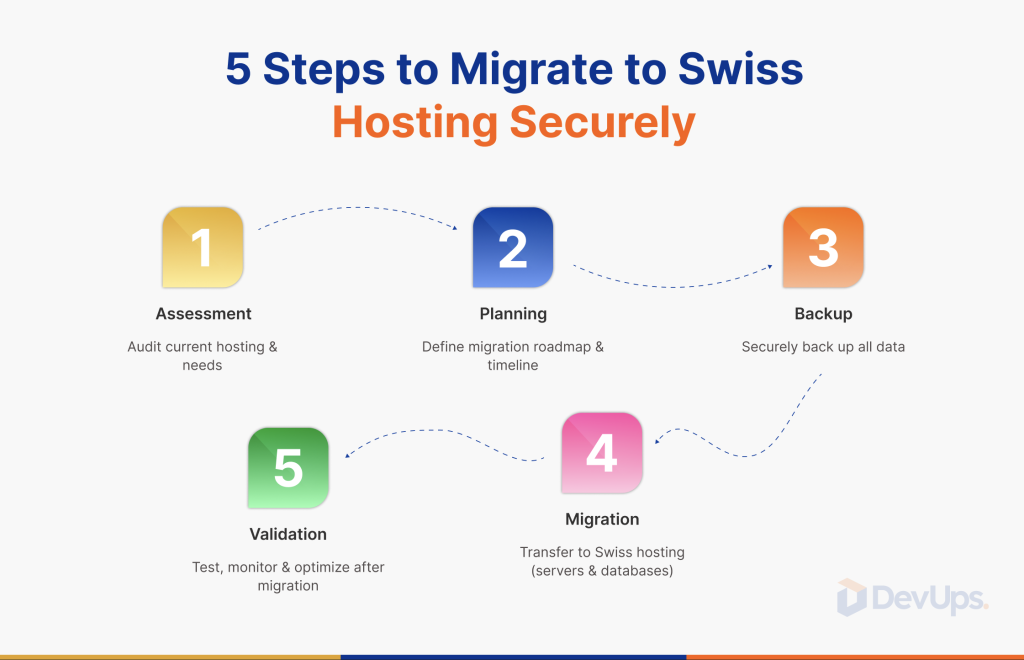
How to migrate to Swiss hosting (without breaking things)

At DevUps, we help companies migrate with zero downtime and full transparency.
Here’s the method we use:

  1. Audit your current infrastructure: review dependencies, DBs, plugins, APIs
  2. Choose the right setup: shared server, VPS, or private cloud
  3. Plan the migration: backups, redirects, performance tests
  4. Secure everything post-move: SSL, firewall, password policies
  5. Monitor continuously: alerts, reports, speed optimization

our approach at DevUps

We don’t just host. We design complete, secure digital infrastructures — and Swiss hosting is often part of that system.

Our team helps you with:

  • Access control, API authentication, system architecture
  • Hosting selection based on security and performance
  • Custom integration (CRM, ERP, CMS, Notion, internal tools)
  • Real-time monitoring and automated backups
  • Continuous support from EU-based experts

See how we build secure systems for growing companies 👉 Discover our approach

Bonus: Swiss hosting builds trust not just security

Today, data transparency is a marketing advantage.

When users see:

  • “Your data is hosted in Switzerland” — they feel safer
  • “Compliant with GDPR and hosted outside U.S. cloud laws” — you stand out
  • “Support in French or English, fast and real” — you sound serious

📘 Medium : Mistakes to avoid when switching hosting providers

Conclusion

conclusion
Swiss hosting is about more than protection. It’s about credibility, control, and building long-term trust both technically and strategically.u sérieux.

📩Thinking about migrating? Want peace of mind and full compliance? Contact our experts

Digitize your restaurant: tools and best practices for 2025

Digitize your restaurant not just to follow a trend, but to thrive in a changing market. Today’s diners expect convenience, speed, and digital touchpoints at every stage. Meanwhile, restaurant owners face shrinking margins, rising labor costs, and growing operational complexity.

In this guide, you’ll learn how to digitize your restaurant step by step from point-of-sale to customer relationships and how to do it without losing control or adding complexity.

📌 Want to digitize your business without getting overwhelmed? Talk to our experts

Why digitize your restaurant in 2025?

Restaurant habits have evolved:

  • Customers order from their phones
  • Reservations happen online
  • Contactless payments are the norm
  • Owners need to do more with fewer resources

To digitize your restaurant is to stay relevant, scalable, and efficient.

Benefits include:

  • Automation of daily tasks
  • Real-time data and reporting
  • Streamlined staff and stock management
  • Better customer experience

Related read : How to Build a Real Digital Transformation Roadmap in 5 proven steps

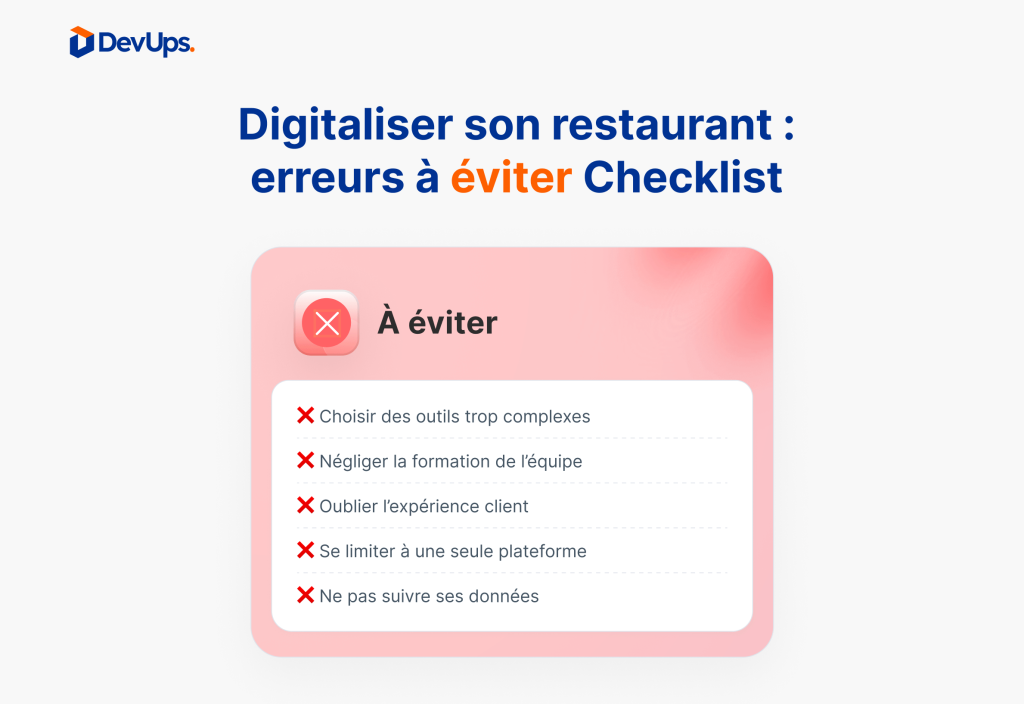
Mistakes to avoid when you digitize your restaurant

Before you start adding tools or paying for apps, watch out for these common mistakes:

  1. Using too many disconnected systems
  2. Thinking digital = a custom mobile app
  3. Skipping staff training
  4. Ignoring post-visit engagement
  5. Trying to automate everything too fast

Essential tools to digitize your restaurant

Here are some proven solutions across core areas of your business:

1. Ordering and payment systems

  • Interactive QR code menus
  • Cloud-based POS
  • Contactless payment systems
  • Online checkout for pickup or delivery

2. Reservations and customer experience

  • Tools like OpenTable, Resy, or ZenChef
  • Automated confirmations + reminders
  • Lightweight CRM for repeat guests

3. Internal operations and team workflow

  • Scheduling apps (e.g., Planday, Notion, Combo)
  • Inventory and stock tracking
  • Dashboards for sales, hours, table turnover

Read also : Automate tasks without code using Zapier

How to digitize your restaurant without chaos

Tools don’t solve problems — good systems do.

💡 Here’s what we recommend at DevUps:

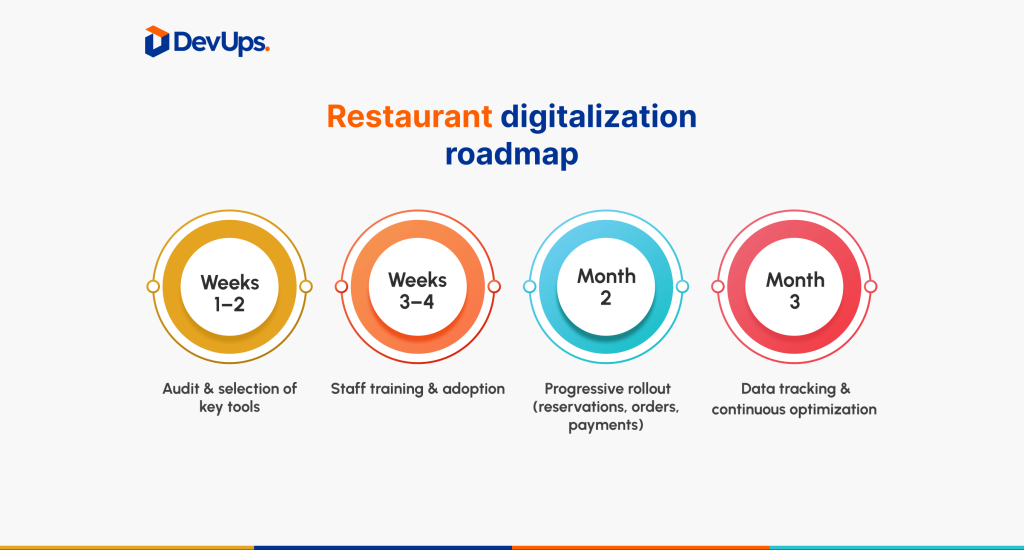
  • Start with 1–2 processes (e.g., payments + scheduling)
  • Train your staff through simple videos or live onboarding
  • Assign a digital owner (or let us manage it)
  • Track impact monthly

our hybrid approach at DevUps

At DevUps, we don’t sell software.

Instead, we design a complete digital system tailored to restaurateurs who want to digitize their restaurant without losing control or connection.

You want to:

  • Automate without losing the human touch
  • Track performance without technical complexity
  • Innovate without rebuilding everything from scratch

That’s exactly where we come in.

Our team supports you from start to finish and beyond.
We guide you through:

  • A digital audit of your current tools
  • Strategic tool selection, ensuring interoperability
  • Integration and automation using tools like Zapier, Notion, or Google Sheets
  • Post-launch follow-up, monitoring, and continuous optimization

👉 Discover our full digital methodology

Conclusion

To digitize your restaurant is not about going “fully digital.” It’s about choosing smart systems that make your daily work easier, more scalable, and more profitable.

📩 Need help digitizing one process or your entire operation?Contact our experts

Hire a freelancer safely: the complete guide

Hire a freelancer is often the smartest way to bring agility, expertise, and speed into your projects without the commitment of hiring full-time. But done wrong, it can lead to delays, misalignment, wasted budget, or low-quality results.

In this article, we’ll walk you through how to hire a freelancer securely, with the same structured approach we use at DevUps in our hybrid model. Whether you’re outsourcing your first task or scaling operations, this guide will help you stay in control and reduce risk.

📌 Need expert help without the HR headaches? Contact our experts

Why hire a freelancer?

When done right, hiring a freelancer comes with real benefits:

  • Flexible budget and commitment
  • Fast access to specialized talent
  • Shorter recruitment cycles
  • No long-term HR burden

But to get these benefits, you need to manage the process like a strategic partnership, not a casual task.

Common mistakes when you hire a freelancer

Here are 5 mistakes we often see:

  1. Choosing based only on price
  2. Skipping the portfolio or reference check
  3. No clear scope, timeline, or deliverables
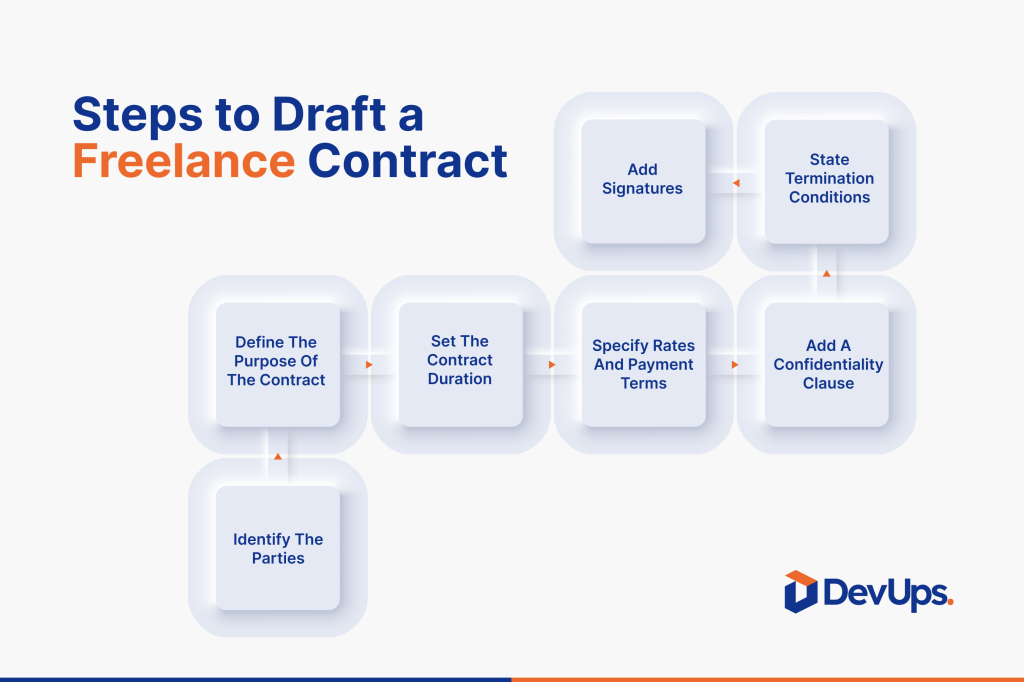
  4. No contract or NDA
  5. No check-ins or feedback points

📘 Related blog : How to run an effective agile sprint

How to hire a freelancer safely and effectively

This is the same method we use at DevUps to source, frame, and manage freelance experts across 9 divisions:

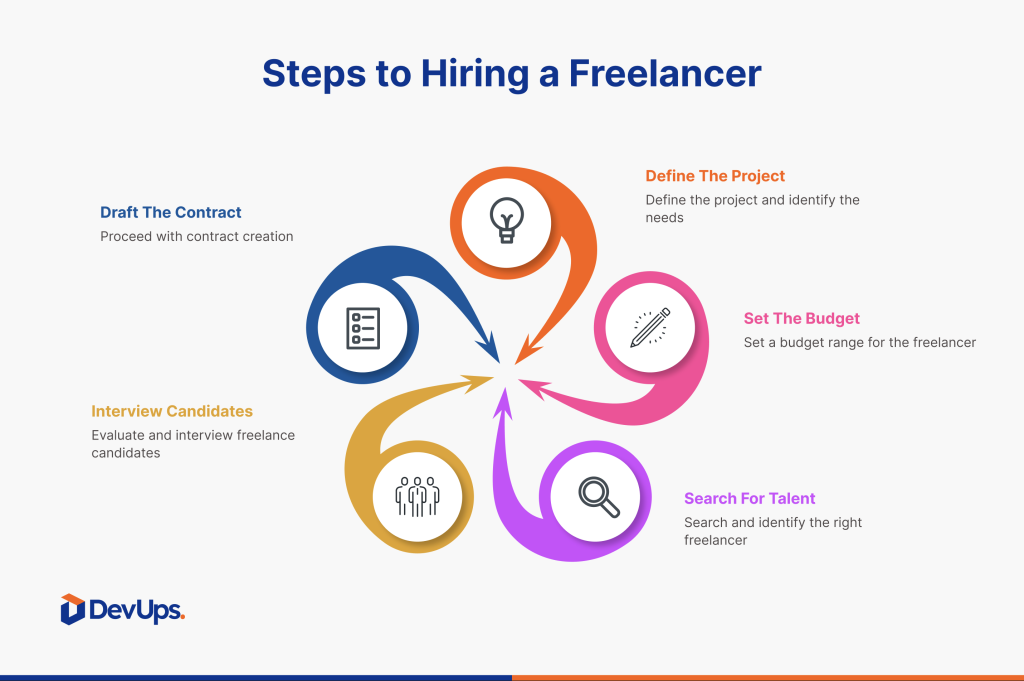
1. Define your needs clearly

Before you search for anyone, make sure you:

  • Outline goals, deliverables, timeline
  • Identify required skills
  • List dependencies (tech, content, UX…)

2. Choose the right freelancer (not just the cheapest)

Evaluate based on:

  • Relevant portfolio and past projects
  • Communication quality and responsiveness
  • Ability to work within your team structure

💡 Tip: Freelancers used to working with agencies are often more structured and reliable.

3. Formalize everything before starting

Always get:

  • A signed contract or statement of work
  • A non-disclosure agreement (if needed)
  • Milestone plan with review checkpoints

4. Set up communication and accountability

Even though they’re external, freelancers need:

  • Quick onboarding (context, tools, expectations)
  • Regular check-ins (weekly or async)
  • A clear internal point of contact

5. Make deliverables usable internally

A great freelance output is useless if it’s not:

  • Understandable by your team
  • In the right format
  • Embedded in your tools (Notion, CRM, Figma, Dev…)

At DevUps, all freelancers deliver inside structured systems with clear formats, guidelines, and integration flows.

what we do at DevUps

We’ve built a unique model:
A core internal team + a certified freelance network, fully coordinated by our project leads.

That means:

  • You access high-level talent on demand
  • With no compromise on consistency or security
  • And one single point of contact: DevUps

👉 Discover our approach

Conclusion

Hiring a freelancer is a smart move but only if you do it with structure.
With the right process, you get the flexibility without the stress. With the wrong one, you risk wasting time, budget, and trust.

📩 Need help scoping, finding, or managing a freelancer securely?Contact our experts

Marketing automation: what it is and how to get started

Marketing automation workflows have become essential for agile teams and growing companies. They allow you to personalize at scale, automate repetitive tasks, and drive predictable results without writing code.

But starting without a clear strategy often leads to overcomplicated systems that underdeliver. In this guide, you’ll learn why marketing automation is worth your time, and how to start it the right way — with structure, not chaos.

📌 Want to build your first workflows without breaking your stack? Talk to a DevUps strategist

What is marketing automation?

Marketing automation refers to using software to automatically execute marketing tasks based on user behavior, timing, or conditions while maintaining personalization.

Typical use cases:

  • Email sequences based on actions or inactivity
  • Lead scoring and segmentation
  • Follow-up reminders or alerts for sales teams
  • Internal task creation based on prospect status

The goal: send the right message to the right person at the right time, without doing it manually.

Why start marketing automation now?

Here are 5 reasons our clients consistently see success:

  1. Time saved on repetitive tasks
  2. Faster reaction to user behavior
  3. Improved customer experience through personalization
  4. Smarter sales workflows (focus on hot leads)
  5. Clearer reporting with trackable metrics

📘 Related blog : Build a high-converting digital funnel

Marketing automation mistakes to avoid from day one

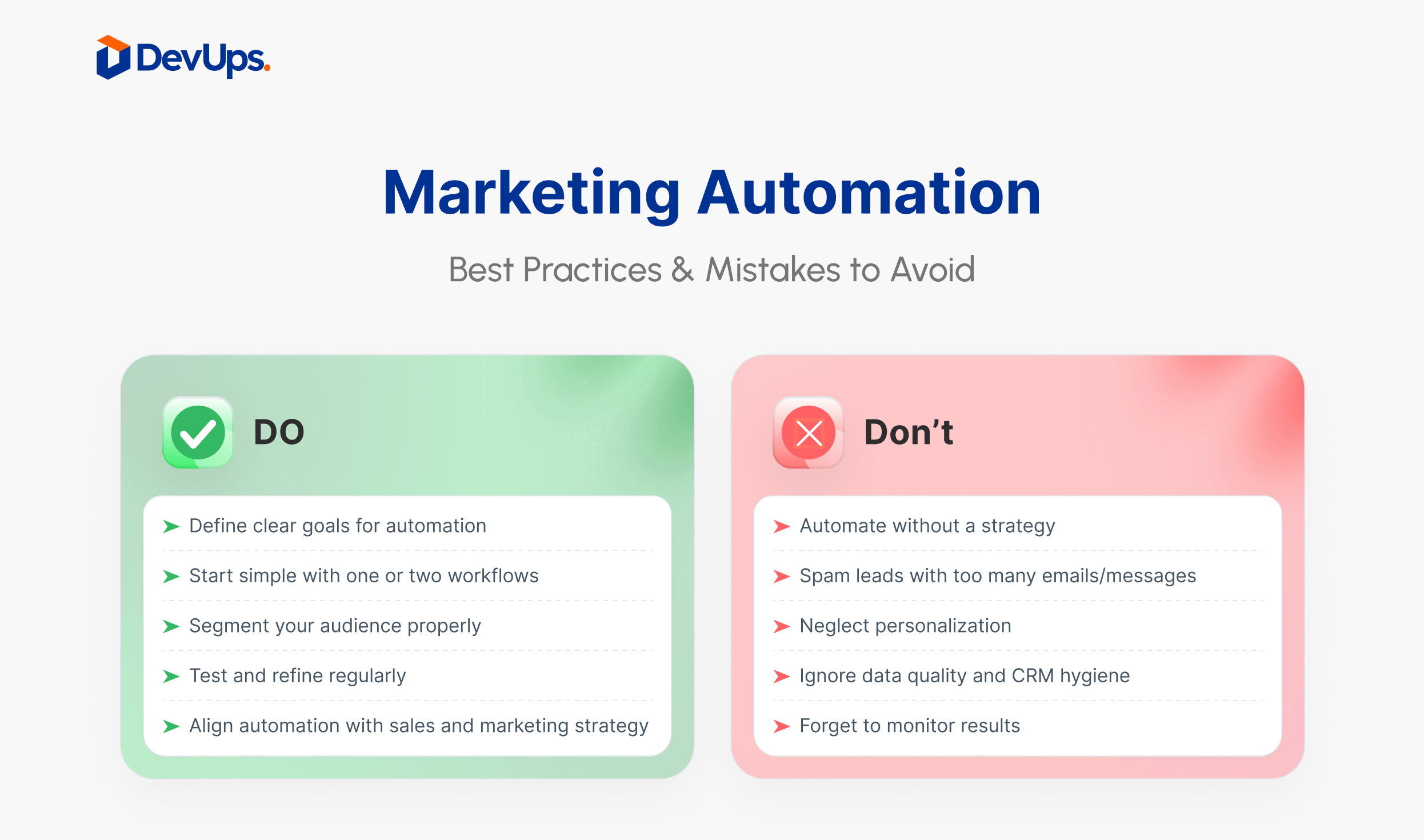
The most common mistake? Automating too much, too soon.

❌ Here are others to avoid:

  • No segmentation or personalization
  • One-size-fits-all messaging
  • Using multiple tools with no central strategy
  • No KPIs or follow-up
  • Forgetting the human layer

A single, well-targeted automation outperforms a bloated, disconnected system.

Where to start with marketing automation workflows

Follow these 4 key steps to start smart:

1. Define your goals

Do you want to convert more leads? Reactivate inactive users? Upsell automatically?

Start with the why not the tools.

2. Choose the right tools

  • Simple: Mailchimp, Brevo, ActiveCampaign
  • Advanced: HubSpot, Salesforce
  • Connectors: Zapier, Make

👉 See how DevUps uses Zapier + more to automate intelligently

3. Map your automation flows

Plan user journeys like:

  • Newsletter signup → welcome sequence
  • Ebook download → score + nurture
  • Cart abandonment → email reminder

📘 Medium article: Build your first automation scenario in 10 minutes

4. Track, learn, and improve

Set clear KPIs from the start:

  • Open and click rates
  • Conversions
  • Revenue generated per campaign
  • Unsubscribes or inactivity

Your best automations will come from iteration, not guesswork.

What we do at DevUps

At DevUps, we don’t just install automation tools.
We build scalable, human-centered systems that grow with you.

Our method includes:

  • Process audit and opportunity mapping
  • Custom workflows across tools (CRM, newsletters, content, Notion…)
  • Behavioral segmentation and dynamic content
  • Dashboard creation for KPI tracking
  • Long-term support and performance tuning

👉 Explore our automation services

Conclusion

Marketing automation isn’t a tactic , it’s a long-term strategy.
When done right, it multiplies your marketing efficiency without sacrificing personalization.

📩 Want to build your first automation workflows without the tech overwhelm?Contact our experts

Automate with zapier: manage your tasks without code

Automate with Zapier , it’s now possible without being a developer. This powerful no-code tool lets you connect thousands of apps, eliminate repetitive tasks, and create powerful workflows, no programming required.

In this guide, we’ll show you how to automate key processes using Zapier, avoid common mistakes, and scale your system efficiently as part of a larger digital strategy

📌 Want to simplify your operations without hiring a dev team? Talk to a DevUps automation expert

1. Why automate with Zapier?

Zapier lets you connect over 6,000 applications through no-code automations called “Zaps” , sequences built from triggers and actions.

Why it matters:

  • No more copy-pasting between apps
  • Tools like Gmail, Notion, Slack, or HubSpot finally sync
  • Teams can focus on high-value work, not admin

Example : when someone fills out a form, a contact is created in your CRM and your sales team gets notified in Slack.

automate with Zapier for marketing, HR, sales, and support tasks- DevUps

2. Common mistakes when you automate with Zapier

Like any powerful system, it can get messy if you jump in too fast.

What to avoid:

  • Automating too many things at once
  • Ignoring app/API limitations
  • Skipping testing
  • Not documenting your Zaps

💡 Start small, test often, and scale from there.

📘 Related blog: Digital transformation mistakes

3. Simple workflows to automate with Zapier

Here are practical Zaps that save time for marketing, HR, sales, and support teams:

  • Marketing: send Typeform responses to Mailchimp
  • HR: create a Trello onboarding task for each new hire
  • Sales: notify the team in Slack when a deal closes in HubSpot
  • Support: generate a Notion record for every new support ticket
automate with Zapier to connect tools without coding- DevUps

4. Automation with Zapier isn’t about replacing people

Zapier doesn’t replace human judgment , it frees it up.

A good automation is:

  • Transparent: people know what’s happening
  • Secure: no exposed sensitive data
  • Controlled: easy to pause or modify

🔗 Automating without governance leads to chaos. See how DevUps keeps automation structured

5. Integrate Zapier into a broader strategy

Zapier is a great starting point. But for long-term scalability, it must plug into a wider ecosystem — including CRM, operations, content, and reporting.

At DevUps, we integrate Zapier into modular systems with:

  • CRM (HubSpot, Pipedrive, etc.)
  • Notion / Airtable for operations
  • APIs and internal data sync
  • Automated follow-ups, content, newsletter workflows

📘 Read next: Build a high-converting digital funnel

6. Bonus: Medium tutorial for first-time users

Want a step-by-step walkthrough on how to create your first Zap without writing code?

👉 Read our Medium article : Build your first Zap in 10 minutes

What we do at DevUps

We don’t just teach automation.
We design systems that scale, connect, and evolve with your business — without technical overhead.

Here’s how we help:

  • Automation audits + process mapping
  • Tool integration across departments
  • Custom workflows in Zapier, Make, Notion, Airtable
  • UX, CRM, and content automation
  • Long-term support and evolution

Conclusion

Automate with Zapier and you’ll free up time, reduce friction, and streamline your operations.
But automation only works when you build it with intention.

📩 Vous avez deWant to remove manual work without losing visibility or control?Contact our experts